ScannerID Software
One software, multiple business solutions. Adapt the system to your specific needs without complications.
Choose the Mode that Fits Your Business
One software, six specific solutions. Click to learn about each mode in detail.
Standard Mode
Basic and efficient capture of identity documents without additional processes.
Access Registration
Complete visitor control in buildings, residential complexes, and controlled spaces.
Attendance Registration
Efficient management of attendees to events, conferences, seminars, and trainings.
Membership Query
Instant membership status verification with member photo display.
Reservation Confirmation
Instant reservation verification for the current day in restaurants, theaters, and events.
Hotel Application
Streamline check-in by capturing essential data in seconds, allowing your team to focus entirely on hospitality.
The 6 Operation Modes
Each mode designed for a specific use case
Standard Mode
Basic and efficient capture of identity documents. Ideal for operations requiring personal information collection without additional processes.
Perfect For:
- Civil registry offices
- Personal data capture points
- General identification systems
- Demographic information collection
Key Features:
- No additional requirements
- Fast and efficient capture
- Ideal for high-volume captures
- No operator intervention required
Operation Flow:
Document scanning
Automatic data capture
Secure storage
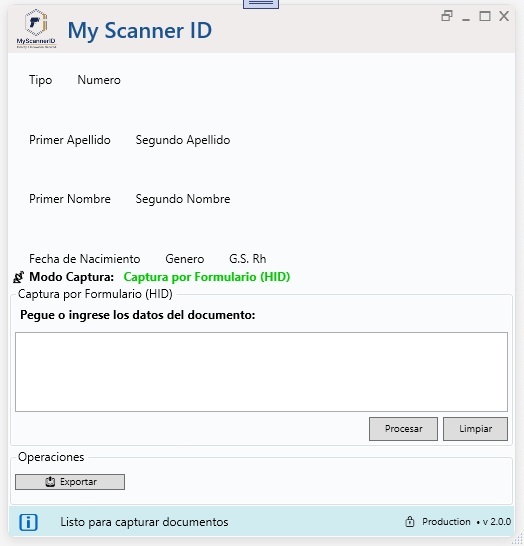
Access Registration
Complete visitor control in buildings, residential complexes, and controlled spaces. Detailed record of who visits, whom, and where they're heading.
Perfect For:
- Corporate buildings - Visitor control for companies
- Residential complexes - Apartment visit registration
- Business parks - Access control to restricted areas
- Universities - External visitor registration
- Hospitals - Patient visit control
Key Features:
- Automatic entry date and time registration
- Capture of visited person and destination information
- Complete visit traceability
- Traffic report generation
Operation Flow:
Visitor at reception
Document scanning
Visit information
Registration completed
The system requests additional information: Whom are you visiting? and Where are you heading?
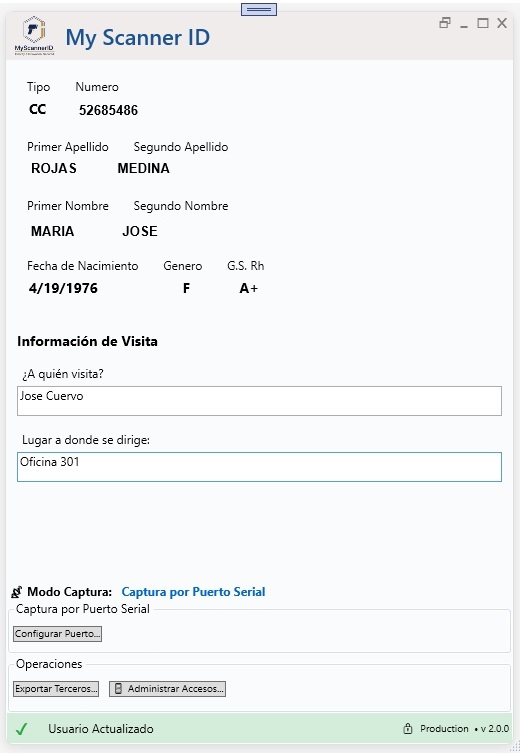
Attendance Registration
Efficient management of event, conference, seminar, and training attendees. Configure the event once and register hundreds of attendees without re-entering data.
Perfect For:
- Conferences - Attendance registration for talks and presentations
- Seminars - Participant control in trainings
- Corporate events - Launches and presentations
- Academic events - Congresses, symposiums, workshops
- Mass meetings - Assemblies and conventions
Key Features:
- Event name persists between scans
- Efficient mass registration throughout the event
- Automatic arrival time timestamp
- Ideal for high-volume attendance events
Operation Flow:
Configure event name
Attendee arrives
Quick scan
Automatic registration
Differential Advantage
Event name DOES NOT clear between scans, allowing registration of 500+ attendees without reconfiguring.
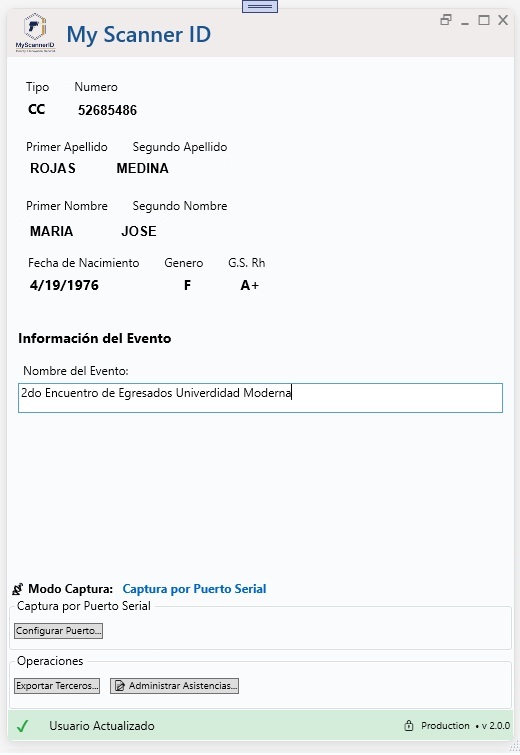
Membership Query
Instant membership status verification with member photo display. Smart access control with color coding for quick decisions.
Perfect For:
- Gyms - Validate active membership before allowing entry
- Social clubs - Member access control
- Pools - Verify enrollment validity
- Sports centers - Validate facility access
- Libraries - Confirm active membership
Key Features:
- Instant query without operator intervention
- Visual validation with color coding
- Member photo display for verification
- Clearly visible expiration date
Operation Flow:
Member arrives at access
Document scanning
Automatic query
Visual status + Photo
Visual States:
Current membership - Allow access
Expired membership - Deny access
No registered membership
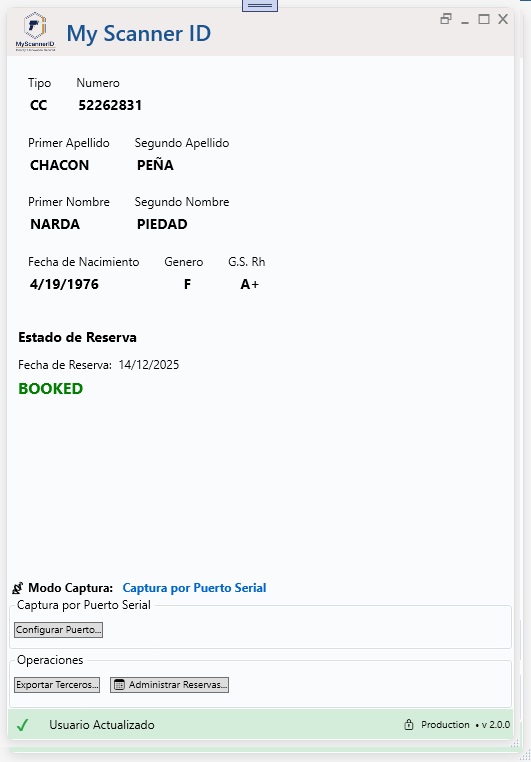
Reservation Confirmation
Instant reservation verification for the current day. Perfect for restaurants, theaters, and events requiring attendance confirmation with prior reservation.
Perfect For:
- Restaurants - Confirm table reservation before assigning
- Theaters - Validate seat reservation for the day's show
- Cinemas - Confirm reserved ticket
- Shows - Verify reservation for specific event
- Hotels - Confirm check-in of existing reservation
Key Features:
- Validation only for current day
- Instant query without additional data
- Shows reservation date if exists but not for today
- Prevents assignment errors
Operation Flow:
Customer arrives
Document scanning
Reservation search
Visual confirmation
Reservation States:
Confirmed reservation for today
Reservation for different day
No registered reservation
If the reservation is for another day, the system shows the actual date so the operator can reassign or check availability.
Hotel Application
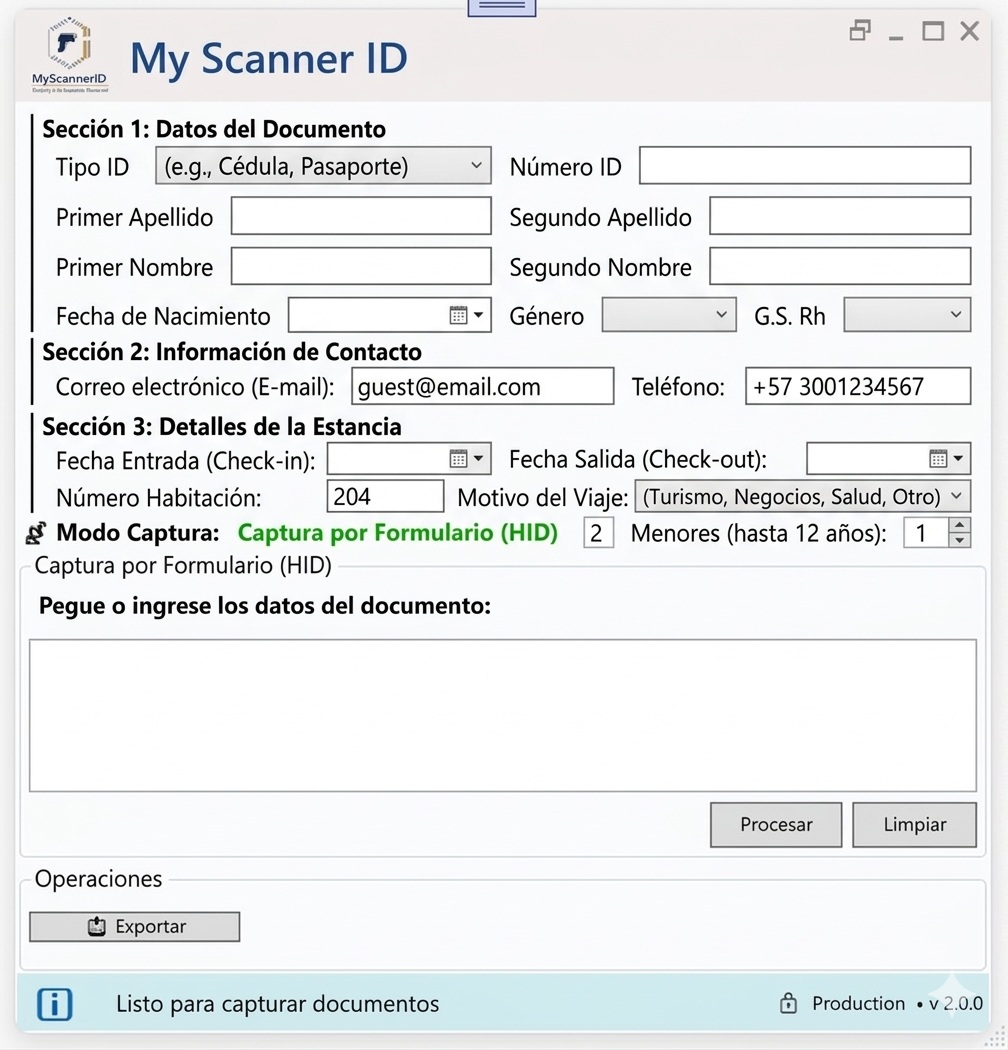
Streamline check-in by capturing essential data in seconds, allowing your team to focus entirely on hospitality. Complete check-in management with automatic capture of personal information, stay details, and electronic invoicing.
Perfect For:
- Boutique hotels - Deliver premium experience from check-in
- Hotel chains - Standardize registration process
- Hostels - Expedite guest admission
- Aparthotels - Efficient management of extended stays
- Inns - Fast and personalized registration
Key Features:
- Automatic capture of identity document data
- Registration of check-in and check-out dates
- Real-time room number assignment
- Automatic electronic invoice delivery to email
- Registration of companions (adults and minors)
- Compliance with migration registration regulations
Operation Flow:
Guest arrives at reception
Document scanning
Complete stay details
Registration + invoice delivery
The system automatically captures: Full name, Document, Nationality, Date of birth, Email, Phone, and allows registration of: Stay dates, Room number, Companions and Travel purpose.
Ready to Optimize Your Processes?
Get the complete package with all 6 operation modes included
✓ Complete software with 6 modes • ✓ 2D reader included • ✓ Installation and training